
In-Person Hiring Event Resources
Thank you for registering for an upcoming Hiring Our Heroes’ in-person hiring event. Information provided below will help your organization make the most of the event.
Pre-Event Virtual Booth (Optional)
The platform offers many features; you can preview candidate profiles, invite candidates to a chat, review resumes, showcase your company’s open job positions, and more. The virtual booths are designed to foster informed conversations between job seekers and employers, before, during, and after an event.
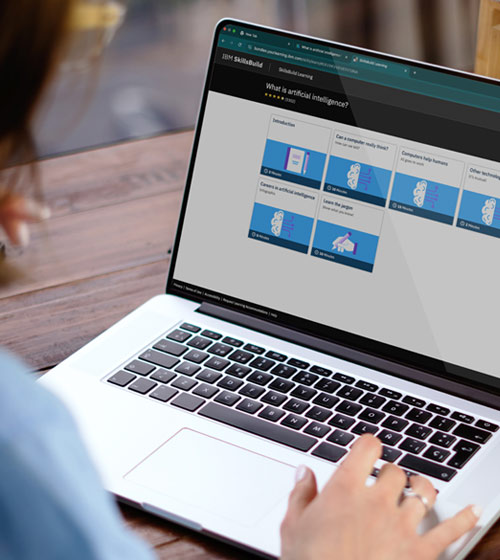
Short on time? IBM SkillsBuild makes it easy to upskill in minutes. With over 1,000 courses, job seekers can start small and develop skills that make an impact, perfect for a lunch break or a weekend deep dive.
Why job seekers will love it:
- Free access to IBM’s global learning platform
- In-demand topics like data science, cybersecurity, and more
- Microlearning modules for quick wins
- Digital badges to showcase your skills
- Flexible learning paths from 5 minutes to full programs
Start today and build the skills to future-proof your career!
Please review the following items to ensure you have a productive event experience.
Event Timeline and Deadlines
12 Weeks Prior to Event
Each event’s registration portal launches on a rolling basis, usually 12 weeks before an event. Please visit the HOH Events Calendar frequently to register for upcoming in-person events.
Base Access
Most in-person Hiring Our Heroes events are held on military installations. Many installations have strict deadlines for base access, some up to four weeks prior to the event. We want to ensure our employers have a positive experience. Registering last minute could result in missing base access deadlines. If you have registered for an event, have been approved to attend, and have not yet received base access instructions, please email hohsummits@uschamber.com. Remember to register all member of your organization that plan to attend for base access.
14 Days Prior to Event
Radancy Booth Access:
- You will receive an email from notifications@radancy.com when your booth is ready. If you do not see it, please check your spam folder.
- Log in to your account: https://app.brazenconnect.com.
- Learn how to build a virtual booth for an in-person event with Hands-On Help: Build a Booth
- The event will not appear on your Radancy dashboard earlier than 2 weeks prior to the event date.
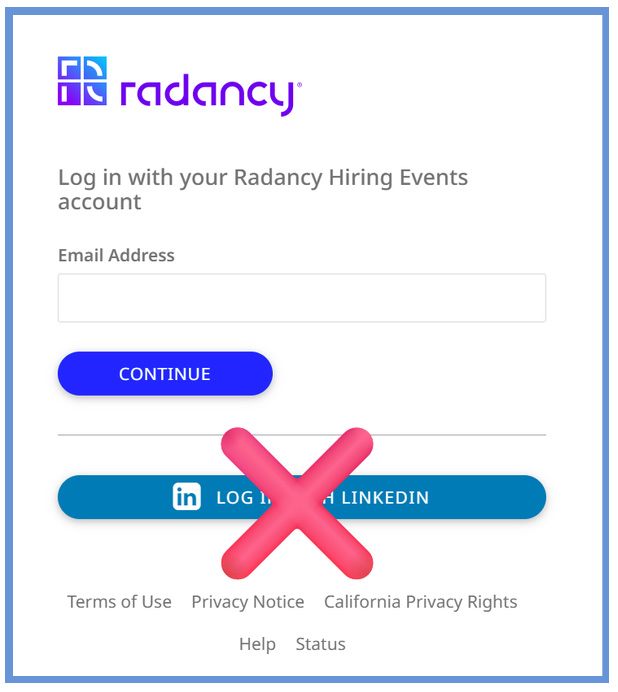
- Please DO NOT use a third-party login (LinkedIn, Google, etc.) to access Radancy. Only use the company email address you used to register for the event.
- Please DO NOT share email addresses for more than one booth owner or representative. There should be one unique email per representative.
7 Days Prior to Event
An email with detailed on-site event logistics will be sent to all approved employer representatives. We recommend you save hiringourheroes@uschamber.com and hohsummits@uschamber.com as trusted email addresses as some company firewalls can send automated emails into junk or spam folders. These emails will provide important on-site information to include:
- Employer Check-In & Set-Up Instructions
- Parking
- Base Access
- And more!
Prior to Event
Have at least two representatives added to your Radancy booth.
- NOTE: Attendees may be in different phases of their career searches, ranging from exploration to ready-to-hire.
- Representatives should be prepared to speak about nationwide opportunities, job families, and/or provide introductions to the appropriate recruiter.
- Representatives should be prepared to interact with job seekers.
- Your booth should have company content and representatives.
- 7 days prior to the event, job seekers will have access to view employer booths in Radancy.
- Employers will have access to job seeker resumes and demographics (to include service branch, years of service, and current location) before the event.
New Radancy Features
Radiancy’s in-person event tools are designed to help your team make faster, more meaningful connections with candidates — before, during, and after the event.
Pre-Event Access to Candidate Resumes & Demographics
Before the event begins, employers can review registered job seekers' resumes and demographic information directly within the Radancy platform. This includes service branch, years of service, and current location — giving your team the opportunity to identify strong candidates, prepare tailored talking points, and prioritize conversations before you ever step on-site.
Personalized Attendee QR Codes (New!)
Employers QR code can be accessed through the Radancy Portal after you create an account or log in. Event Representatives can access the Scan QR Code feature within the event application side menu and through Attendee Lookup.
TIP: Always scan QR codes from within the Radancy event app (not your phone's native camera) to stay authenticated and take immediate follow-up actions like connecting or checking in a candidate.
Attendee Lookup — Quickly Connect On-Site
Attendee Lookup allows representatives to search for and connect with candidates or other employer representatives directly within the Radancy platform during in-person events. Whether you want to follow up with someone you met at another booth or connect with a candidate who hasn't visited yours yet, Attendee Lookup makes it easy to find and engage — no business card required. When a QR code is scanned, the candidate's profile loads automatically in Attendee Lookup, streamlining the connection process.
Before Leaving the Event
Complete a Survey!
Every employer must complete an exit survey to report resumes collected, interviews conducted, and offers extended. Surveys will be available on-site at the event.
After the Event
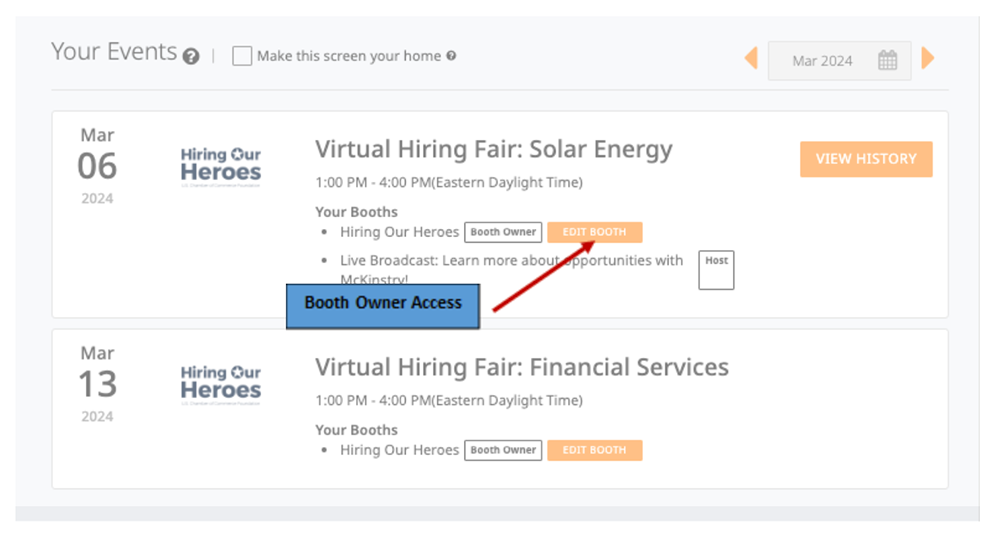
Booth owner reports will be available after the hiring event. Here are instructions on how to access the Booth Owner reports.
Radancy Booth Preparation
Requested Information:
It is not required to add information or graphics to your booth for in-person events. If you choose not to set up a Radancy booth or track in-person connections, it will not have a negative impact on your event experience.
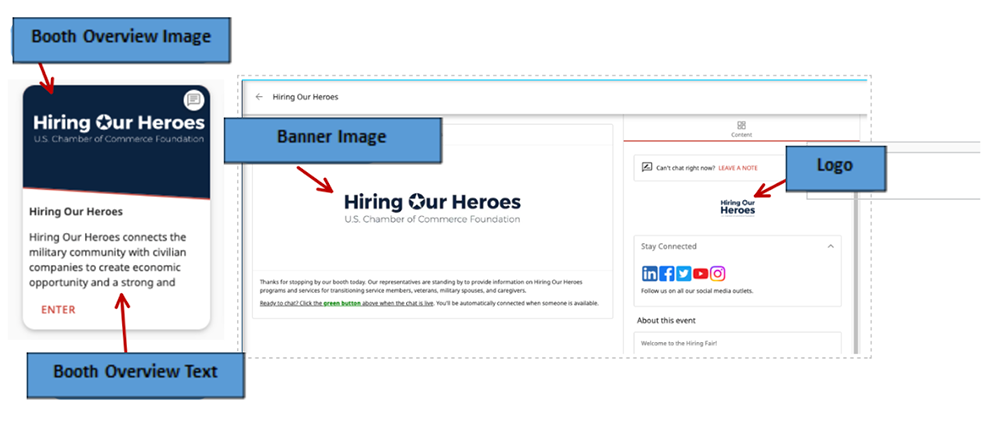
- Company logo/graphic (150px x 150px; gif, jpeg, jpg, or png)
- Booth image (500px x 300px)
- Text for the “Booth Overview” (100 words or less)
- Banner image (1024px x 344px)
- Text for the booth’s “Home” section
- Website link for company’s “Careers” page
- Overview of company’s mission
- Breakdown of company divisions/job families
- Brief list of benefits available
- Text for booth’s “Opportunities” section
- Links to at least five position descriptions
- Include two positions that do not require specialized industry experience as entry points for transferable experience.
Recommended Information:
- "About Us" section with information about company culture, employee resource group, company’s history, etc.
- Video (YouTube or Vimeo link – embed code)
- In-Person Booth Owner Checklist (PDF)
Prepare Your Team: Radancy
Prepare yourself and your team members by:
- Completing training modules on Radancy Academy.
- Use your Radancy credentials to access the platform (work email and Radancy password). If this is your first time utilizing Radancy, you will receive access via email confirmation from support@brazen.com.
- Learn about the different types of candidates you may interact with: VetEmployerRoadmap.org.
Prepare Your Team: On-Site Expectations
Prepare yourself and your team members:
- Each company’s on-site booth will include one table (6 or 8 foot) and two chairs.
- We cannot guarantee access to power or internet at our in-person events. If you plan on using a cellular WiFi hotspot, please note the signal is not always reliable and we strongly suggest having a plan to collect attendee information without an internet connection.
What to bring:
- Tablecloth
- Handouts: Hot job lists, recruiting program flyers, business cards, etc.
- Give-away items: pens, keychains, and other branded items for attendees
- Pop-ups, small backdrops, and other company branded marketing materials.
- Tablets, sign- in rosters, and other tools to collect attendee information.
What not to bring:
- Tents and large backdrops
- TV’s
- Tables
- Additional chairs
Technical Requirements/Questions
Please check your technical capabilities two days prior to the event to allow time to troubleshoot any issues.
- Learn about Radancy technical requirements.
- Perform a Radancy service check on your device.
- Troubleshoot audio and video for live video features in Radancy.
Issues or questions?
- Submit a request to the Hiring Our Heroes In-Person Events Team
- Technical issues on the day of the event?
- Email Radancy Support at support@radancy.com.
- Visit Radancy for support articles, troubleshooting tips & FAQs
Post-Event
Post Event Follow Up
- Download Post-Event Reports
- How to download Booth Owner Reports (instructions).
- Contact actionable candidates
- Share Offers and Success Stories with Hiring Our Heroes via email.
- Downloads are available up to 90 days after the event
NOTICE: It is Hiring Our Heroes’ policy that all event records containing attendee information should be protected and kept internal to your organization. Please do not share with outside entities under any circumstances.
We encourage you to connect with attendees one-on-one, rather than sending bulk emails to all participants pre-or post-event.
| In-Person vs Virtual Comparison | ||
|---|---|---|
| In-Person Hiring Fairs, Career Summits, Hiring Events | Virtual Hiring Fairs & Virtual Career Summits | |
| Employer Booth Access | 14 days prior to event | 10 days prior to event |
| Number of Booth Owners/Representatives | 1 booth owner or more, 2 or more representatives | 1 booth owner, 3 or more representatives |
| Download Resumes and Full Candidate Reports | HOH partners only | HOH partners only |
| 12 Hours Post Event | All booth owner reports available (based on partner/non-partner status) | All booth owner reports available (based on partner/non-partner status) |
| Event Attendee Lookup (Employers & Candidates) | 24 months post event | 24 months post event |
| 90 Days Post Event | Booth owner report access ends | Booth owner report access ends |
| Booth Content, Banners, Opportunities, Text and Organizational Videos | Recommended | Required |
| Job Seeker Candidates Have Access to Virtual Side of the Event | One week prior to event | 72 hours prior to event |
| Connection Type (before, during, after event) | Text chat prior to event | Text chat prior to event and during |
- The date the employer registered and venue capacity
- Verification that your company is in good standing with the installation
- The industries represented
- Number of job opportunities available at your company